Kali365 and Sneaky2FA: A 71% Code Match Points to a Shared Phishing Lineage
Phishing-as-a-service kits are not written from scratch. They are forked, resold, and re-skinned, and the code carries its lineage with it. We spent the last few weeks pulling apart the samples we have collected of two Microsoft 365 phishing kits that are usually discussed as separate threats: Sneaky2FA, the adversary-in-the-middle (AiTM) kit that Sekoia first exposed in January 2025, and Kali365, the device-code phishing platform the FBI issued a public warning about in May 2026.
When we normalized the captured pages and diffed them, the page code and HTML structure came out 71% similar. That is not coincidence. That is shared source.
This post is about what that overlap means, how the attack actually reaches a user, and why the only place to reliably stop it is the browser session itself.
Two kits, one family tree
Sneaky2FA is sold by a group calling itself "Sneaky Log" through a Telegram bot, where buyers receive a licensed, obfuscated copy of the source code. Sekoia's analysis traced part of its authentication relay back to the W3LL Panel OV6, down to reused PNG background images with identical hashes and filenames. In other words, Sneaky2FA was already a descendant of an older kit when it shipped. The Hacker News counted nearly 100 domains hosting Sneaky2FA pages within weeks of its discovery.
Kali365 is newer. It was first seen in April 2026, also peddled on Telegram, and it leans on device-code phishing rather than classic credential relay. The FBI's IC3 advisory describes it as a subscription platform that captures OAuth access and refresh tokens, hands less-technical attackers AI-generated lures and campaign dashboards, and grants persistent access to a victim's Microsoft 365 tenant without ever needing the password.
On paper these are different categories of attack. Underneath, our sample comparison says they share most of their front-end code. This kind of cross-kit overlap is not unusual: newer platforms increasingly ship AiTM components lifted from Sneaky2FA and are converging into a handful of shared phishing front ends. Code reuse is the norm in this market, not the exception.
The 71% figure is our own measurement, not a vendor claim. We computed it by normalizing the captured HTML (stripping volatile values like nonces, timestamps, and per-victim parameters), reducing each page to its DOM structure tree, and comparing those against the obfuscated JavaScript token streams across every Kali365 and Sneaky2FA sample in our collection. The match is concentrated in the pre-login gate and page scaffolding, exactly where you would expect a fork to keep the parent's code.
What the match looks like in practice
The shared code is most visible in the parts of the kit a user never thinks about: the anti-bot gate, the page scaffolding, and the obfuscation.
Both kits front their phishing pages with a CAPTCHA challenge, typically Cloudflare Turnstile, that doubles as an anti-analysis filter. Sekoia documented Sneaky2FA serving benign decoy content first, rotating page titles from a fixed list ("Verify your account," "Confirm your identity"), and redirecting traffic that looks like a data center, VPN, proxy, or scanner away to harmless pages. The Kali365 samples we collected gate the same way. The challenge is not really there to stop bots. It is there to keep crawlers, sandboxes, and security researchers from ever reaching the page that matters.
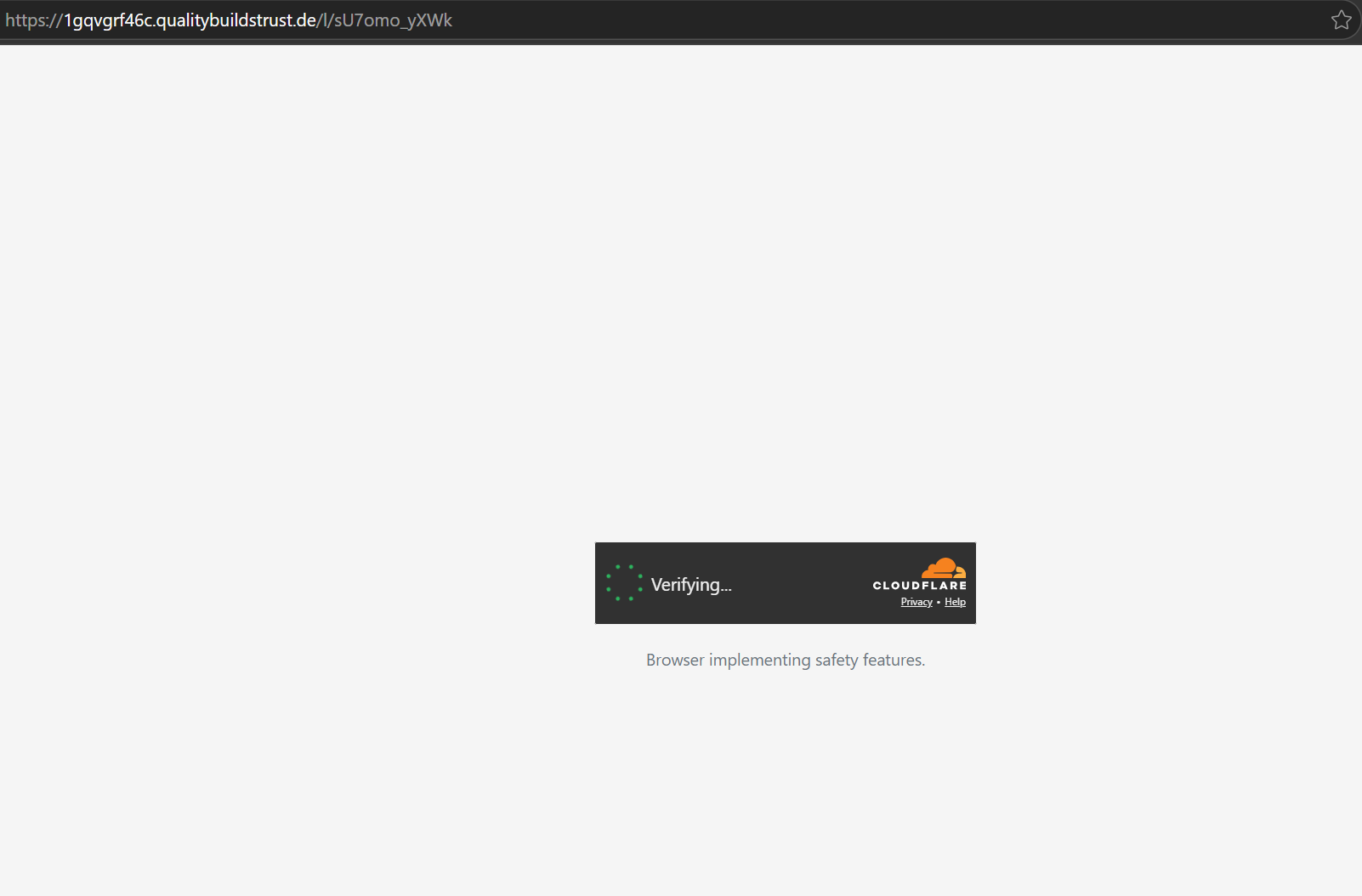
Past the gate, the structural similarity continues: the same section-toggling layout, the same junk-text and fragmented-anchor tricks for breaking up readable strings, and the same style of anti-debugging JavaScript that Sekoia called out in Sneaky2FA. The brand assets are reskinned and the back-end behavior diverges, but the bones are the same file.
Where Kali365 diverges: device-code phishing
The 29% that is different is mostly the payload step, and it is the more dangerous half. Instead of relaying a password and a one-time code through an AiTM proxy, Kali365 abuses Microsoft's OAuth 2.0 device authorization flow.
The sequence, as the FBI describe it, looks like this:
- The attacker requests a device code from Microsoft's authorization endpoint and gets back a short user code.
- The lure directs the victim to a real Microsoft verification page (
microsoft.com/devicelogin) and tells them to enter that code. - The victim, on the genuine Microsoft domain, signs in normally, clears their own MFA, and approves the request.
- Microsoft hands the OAuth access and refresh tokens to the attacker's device, not the victim's.
Because the victim authenticates on the legitimate Microsoft page and satisfies their own MFA, the attacker never touches the password and never has to defeat the second factor. They walk away with tokens that bypass MFA entirely and survive password resets until the refresh token is revoked.
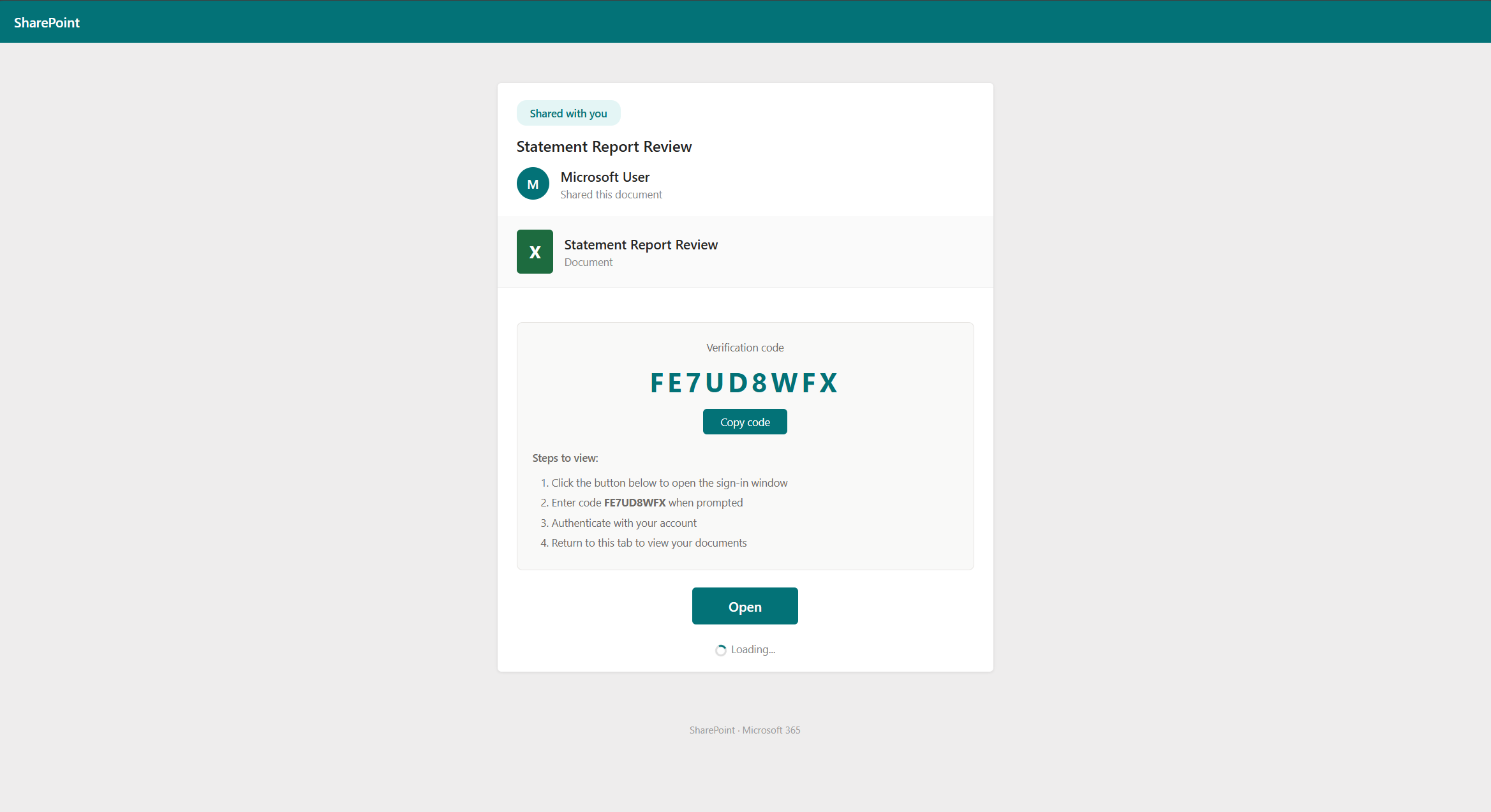
Microsoft's own incident analysis of an AI-enabled device-code campaign in April 2026 noted operators had moved to generating the device code dynamically when the victim clicks, so the 15-minute code lifetime never expires before the victim acts. The lures themselves are now AI-written and tuned to the target's role, with RFP, invoice, and workflow themes. Detections of device-code phishing pages have climbed sharply through early 2026, growing more than 15x in the first quarter alone.
Why this is hard to catch upstream
Device-code phishing is built to slip past the controls most organizations lean on.
- Email security sees a link to a clean page, often on compromised but otherwise reputable infrastructure. There is no malicious attachment and no credential form to fingerprint.
- URL reputation and sandboxes hit the CAPTCHA gate and get filtered out before the real page renders, so the phishing content rarely enters public threat feeds.
- The credential page does not steal credentials. The victim types their password into the genuine Microsoft sign-in screen. There is nothing fake about the page where the secret is entered, which is exactly why it does not trip lookalike-domain detection.
- MFA does not help. The victim clears their own second factor as part of authorizing the attacker's device.
By the time a SOC sees an "impossible travel" alert or a new device registration, the tokens are already issued.
How Surface stops it
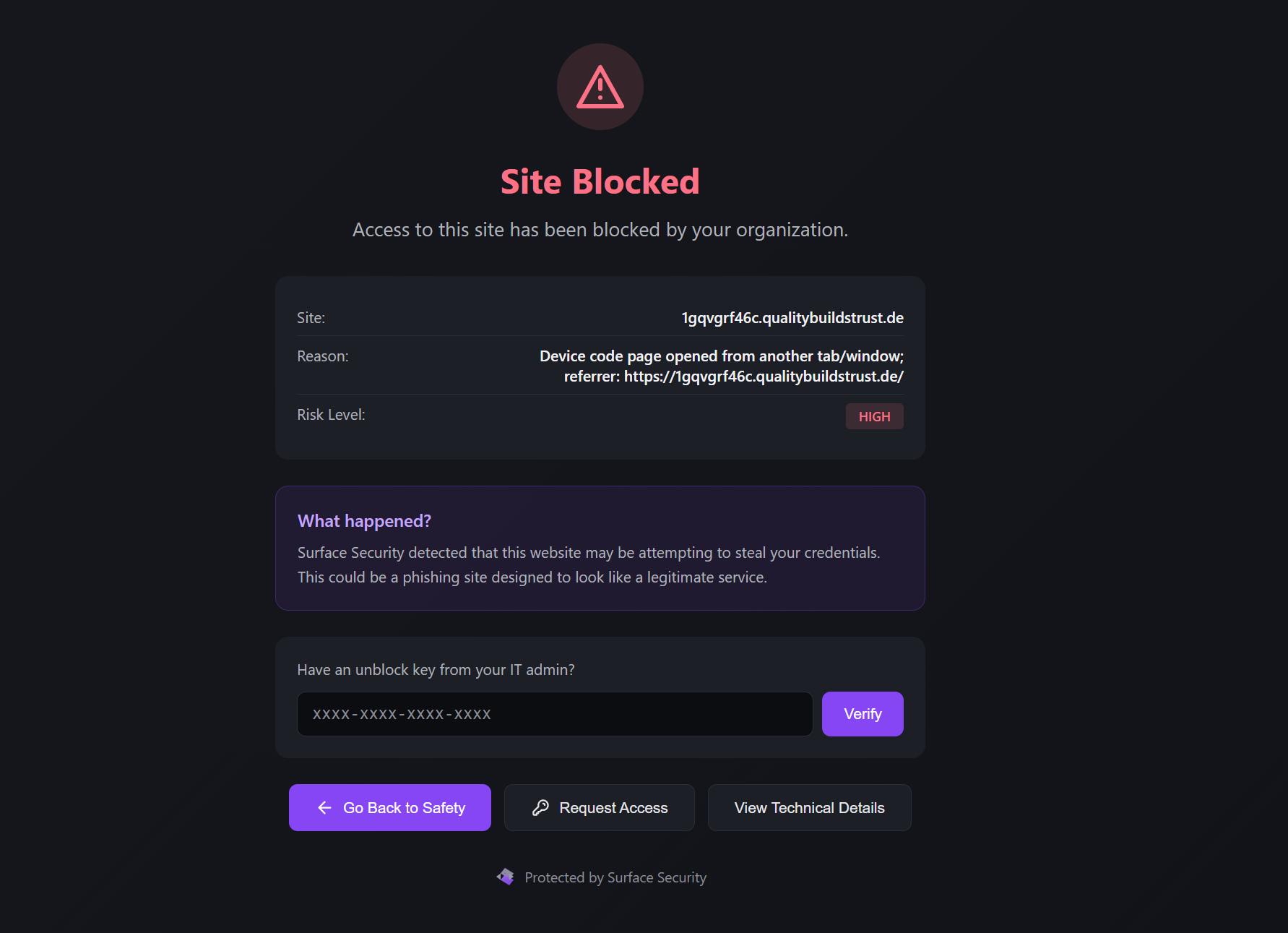
The attack converges, like every kit in this family, inside the browser session. That is the one place where the CAPTCHA gate, the device-code instructions, and the user's interaction are all visible at once. Surface runs there.
Behavioral detection, not content matching
Because the Kali365 lure page contains no fake login form and no harvested field, content heuristics have nothing to grab. Surface watches behavior instead: a page that walks a user toward microsoft.com/devicelogin with a pre-supplied code, served from an unfamiliar origin behind an anti-analysis CAPTCHA, is a high-confidence device-code phishing pattern regardless of how the page is branded. We detect the lure on the document the victim actually sees, before they ever type the code.
Structural fingerprints that survive re-skinning
The 71% code overlap cuts both ways. Kits that share source share structure, and structure is harder to mutate than branding. Surface fingerprints the page scaffolding, the gate behavior, and the obfuscation patterns common to this kit family, so a fresh Kali365 or Sneaky2FA domain that has never appeared on any blocklist still matches on what it is built from, not on a URL someone has already reported.
Block at the point of interaction
When a page matches, Surface blocks it in the session and shows the user why, instead of leaving them on a convincing page with a plausible instruction. The attempt is logged with full forensic context, the page origin, the detected technique, and a DOM snapshot, which is exactly what an incident responder needs to answer "what did the user see, and did they enter the code."
Defense in depth still matters
Browser-layer detection is the catch-all, but it should not be the only layer. Both the FBI and Microsoft recommend the same upstream hardening, and it is worth doing:
- Restrict the device-code flow. Use Conditional Access to block OAuth device authorization where it is not genuinely needed, and exclude break-glass accounts so you do not lock yourself out.
- Move to phishing-resistant MFA. FIDO2 keys and passkeys do not stop a user from approving a device code, but they raise the cost of every other path into the account.
- Watch for token and device anomalies. New device registrations, unfamiliar sign-in locations, and refresh-token use from unexpected clients are the late signals. Treat them as incidents, not noise.
The takeaway
Kali365 reads, in our samples, like Sneaky2FA's next of kin: 71% of the page code and HTML structure is shared, concentrated in the anti-analysis gate and scaffolding that both inherited from the same lineage. The novel part is the device-code payload, which is precisely the part that turns a clean-looking Microsoft page into an MFA bypass.
The unifying lesson across this whole kit family is that the attack lands in the browser, on a page the victim is actively reading, often on Microsoft's own legitimate domain. Email filters, URL reputation, and MFA each miss it for different reasons. The browser session is the one control point where all of it is visible.
If you want to test your stack against live Kali365 and Sneaky2FA samples, or see how Surface blocks device-code phishing in your own browsers, get in touch.