Why Are Browser Extensions a Security Risk for My Business?
Most employees treat browser extensions the way they treat phone apps: install the one that looks useful, click through the permission prompt, move on. The difference is that a browser extension often has deeper reach into your work than almost anything else on the device. It runs on the pages your people visit, can read and modify what those pages show, can see what gets typed into them, and can update itself silently in the background long after anyone reviewed it.
That combination, broad access plus silent updates, is what makes extensions a genuine business risk rather than a nuisance. This post explains what an extension can actually do, the three ways a safe-looking one turns dangerous, and what it takes to manage the problem.
What an Extension Can Actually Do
When an extension is installed, it requests permissions. Users rarely read them, but the permissions are the whole story. The high-reach ones include:
<all_urls>, which lets the extension run on every site the user visits, including your identity provider, your banking portal, and Microsoft 365.webRequest, which lets it observe and modify network requests, including the ability to strip or inject HTTP headers.cookies, which lets it read session cookies, the tokens that keep a user logged in.debugger, which grants near-total control over the page.
An extension holding even a couple of these can read the contents of pages, capture form input, watch authenticated sessions, and exfiltrate what it sees. The capability is not hypothetical or rare. It is the normal permission set for entire categories of popular extensions, including ones that are completely legitimate. The risk is not that the permissions exist. It is that you usually have no idea which extensions across your fleet hold them, or what those extensions are doing with them.
The Silent Update Problem
Here is the part that catches organizations off guard. Vetting an extension once does not make it safe forever.
Extensions update automatically. The version your team reviewed and approved can ship a new version tomorrow that adds permissions, changes behavior, or quietly begins exfiltrating data, with no prompt and no review. This is not an edge case. It is a known attack pattern: a developer with a popular, trusted extension gets a buyout offer, sells it, and the new owner pushes a malicious update to a base of users who never re-consented. The extension's reputation and install count are inherited; its behavior is not.
So the risk has a timeline. An extension can be perfectly safe at install, accumulate trust and users, and then turn, all without anyone in your organization touching it.
The Three Ways Extensions Go Bad
It helps to separate the failure modes, because they call for different defenses:
- Malicious from the start. Built to look useful, designed to harvest data or hijack sessions. Caught by scrutiny at install time.
- Compromised or sold. Legitimate, then turned through a buyout, a developer-account takeover, or a supply-chain compromise of the extension's own dependencies. Caught only by watching for change over time.
- Over-permissioned but legitimate. Genuinely useful, genuinely well-intentioned, but holding far more access than its function requires, which makes it a large blast radius if it is ever compromised. Caught by understanding what is installed and what it can reach.
A program that only checks extensions at install time catches the first category and misses the other two, which are where most real incidents come from.
An extension you approved last quarter is not the same software today. Without monitoring for version and permission changes, a silent malicious update looks exactly like business as usual.
What It Takes to Manage the Risk
Managing extension risk is not a one-time review. It is an ongoing loop of knowing what is installed, scoring how dangerous it is, watching it for change, and being able to act when something turns. Concretely, that means:
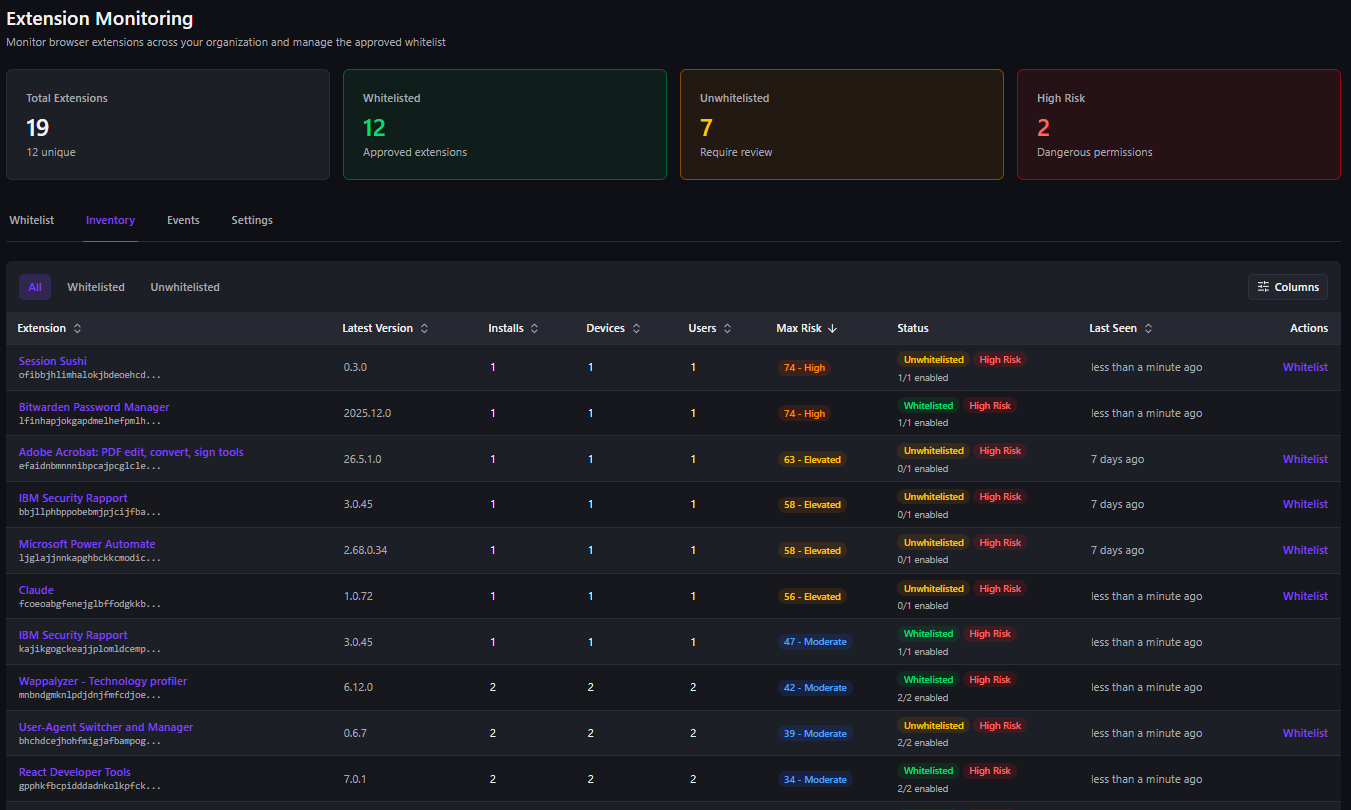
- A full inventory. Every installed extension across every device, with version, install type (admin, normal, sideloaded, or developer), permissions, and first- and last-seen tracking. You cannot manage what you cannot enumerate.
- Automated risk scoring. A 0 to 100 score that weighs dangerous permissions, install method, recent permission escalations, how new or obscure the extension is, and whether it even exists in an official store. This turns a list of hundreds of extensions into a ranked queue.
- Permission analysis with diffs. Flagging high-risk permission combinations, and showing exactly what changed when an extension updates, so silent privilege creep becomes visible instead of invisible.
- Backdoor and version-change detection. Alerting when an update adds risky permissions, and scoring the blast radius across the devices and users affected, so a poisoned update is a notification rather than a post-incident discovery.
- Behavioral anomaly detection. Real-time monitoring on sensitive sites such as identity providers, banking, and Microsoft 365 for security-header stripping, malicious header injection, redirect anomalies, and cookie exfiltration, with confidence tiers so high-confidence threats can be disabled automatically.
- Decoy-based exfiltration detection. Surface's Shadow State Mesh plants marker values in browser storage and cookies and watches for them in outbound requests, which lets it attribute credential or token theft to the specific extension responsible rather than just flagging that something leaked.
Allowlisting That Actually Blocks
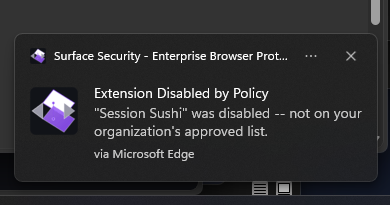
There is an important distinction between tools that tell you about a bad extension and tools that do something about it. Plenty of products will surface an alert and leave the response to you, which means a risky extension keeps running on every affected endpoint until someone gets to the ticket.
Surface supports an admin allowlist with version constraints and quick-add from the live inventory. When enforcement is enabled and confirmed, Surface automatically disables any non-whitelisted extension on the endpoint. It does not just alert on it. Combined with lifecycle event tracking (install, uninstall, update, enable, and disable events feeding the alerts dashboard with compliance-grade audit retention), that closes the gap between detecting a problem and stopping it.
The Takeaway
Browser extensions are a security risk for the same reason they are useful: they have deep access to everything that happens in the browser, and they change on their own. Treating them as a set-and-forget convenience is how a trusted tool becomes the quiet path a credential or session token leaves your organization through.
The fix is not to ban extensions, which breaks workflows people depend on. It is to know what is installed, score it, watch it for change, and be able to disable the ones that turn, all from one place. For more on why the browser extension layer is where so much of the modern threat picture now lives, see The Blob URL Phishing Gap That Most Browser Extensions Can't See.
If you want to see what is actually installed across your fleet and how it scores, get in touch.