How Can I Control Shadow AI Usage on Employee Browsers?
Shadow AI is the AI version of shadow IT: tools that employees adopt without approval, without procurement, and usually without security ever finding out. Someone pastes a contract into a chatbot to summarize it. Someone uploads a spreadsheet of customer records to clean up the formatting. Someone connects a personal AI assistant to a corporate workflow because it saves them an hour a day.
None of this starts with a purchase order. It starts with an employee opening a tab. That is what makes shadow AI hard to govern with the tools most teams already own, and it is why the answer has to live where the activity does: in the browser.
This post lays out a practical, four-step approach to bringing shadow AI under control without turning security into the department that says no to everything.
Why Banning Everything Backfires
The instinct, when AI usage feels out of control, is to block broad categories of tools and require manual approval for the rest. It looks strict. Operationally it fails twice.
First, it slows the business down, and people route around it. Employees adopt AI because it saves time, so a blanket block sends them to personal accounts, personal devices, and tools you have even less visibility into. Second, it pushes more work onto security. Every blocked workflow becomes a ticket, every exception becomes a review, and the team ends up as a human routing layer for decisions that should have been automated. We made the full case for this in How to Reduce Security Overhead and Increase Automation in the Age of AI.
The goal is not to ban AI. It is to let the business use it productively while controlling the few things that actually create risk: which tools, which data, and who is accountable.
Step 1: See What Is Actually in Use
You cannot govern what you cannot see, and surveys do not count. People underreport, and the tool list changes every week.
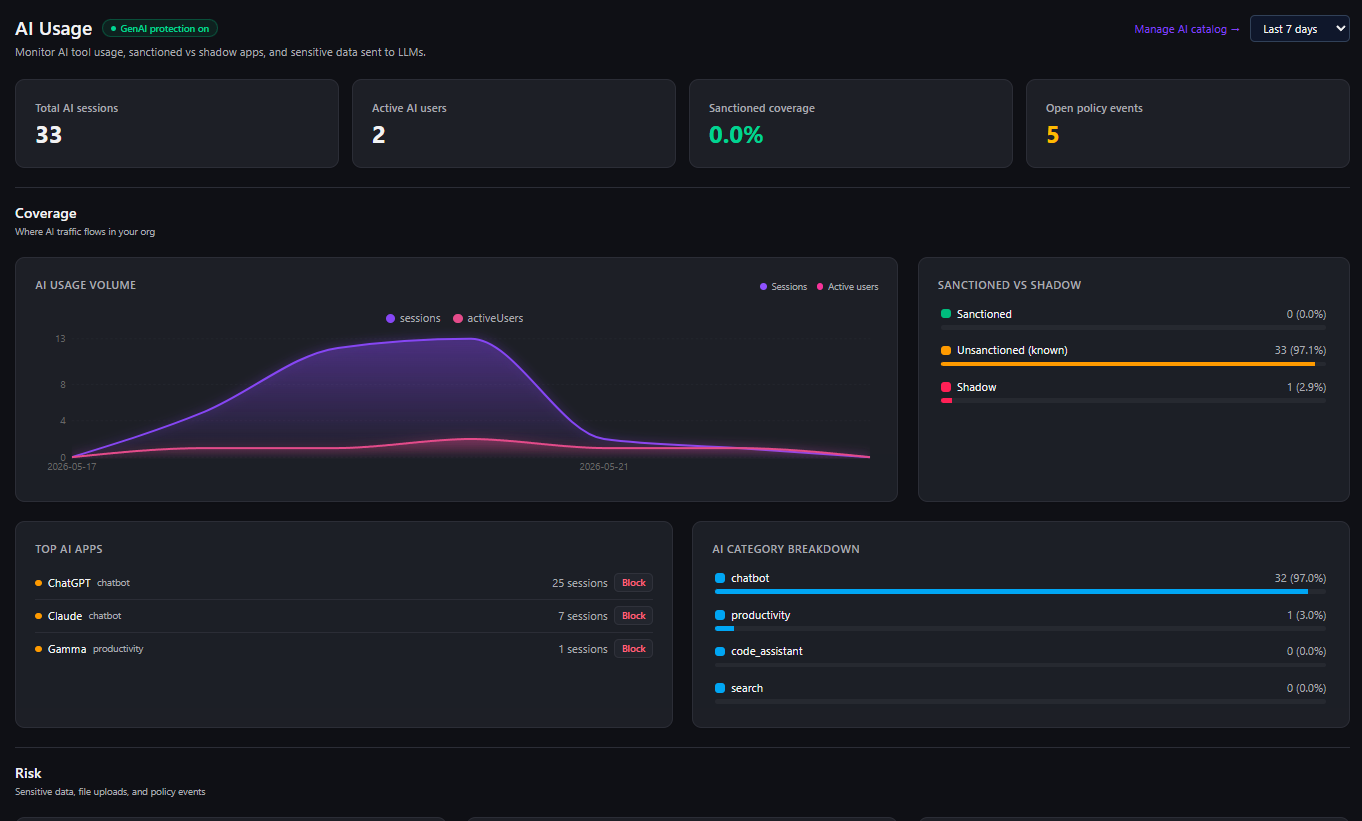
The first move is continuous discovery: a live inventory of which AI tools are in use across the organization, sanctioned or not, built from what the browser actually observes rather than what employees self-report. A usable discovery layer tells you which tools are in play, who is using them, and how adoption breaks down by team, so that every later decision starts from fact instead of anecdote.
Surface does this with an AI usage dashboard backed by a catalog of more than twenty common AI tools, plus detection of tools outside the catalog by their behavior in the browser. The output is a baseline: this is what your workforce is doing with AI right now.
Step 2: Set the Rule Per Tool, Not Per Company
Once you can see usage, the next step is to decide policy at the right granularity. "AI is banned" and "AI is fine" are both wrong because they treat every tool and every user the same. Shadow AI control works when the rule is specific.
That means three enforcement modes, applied per tool and per group:
- Allow the sanctioned tools your teams depend on for general work.
- Warn when someone reaches for a tolerated-but-risky tool, so they get a nudge and a moment of friction rather than a hard stop.
- Block the tools you have decided are off-limits, especially for the groups handling sensitive data.
Pair that with an approved-sites list and custom detection patterns so you can cover the internal copilots and niche tools that no vendor catalog will ever include. The point is to make policy match how your organization actually works, instead of forcing the organization to match a blunt policy.
The fastest way to lose the room is to block a tool people genuinely need. Start most tools in warn mode, watch the usage data, and reserve hard blocks for clear, defensible cases. You can tighten later with evidence behind you.
Step 3: Control the Data, Not Just the Destination
Knowing which tool someone is using is only half the picture. The risk in shadow AI is usually not the tool itself, it is what goes into it: source code, customer records, unreleased financials, regulated data pasted into a prompt or uploaded as a file.
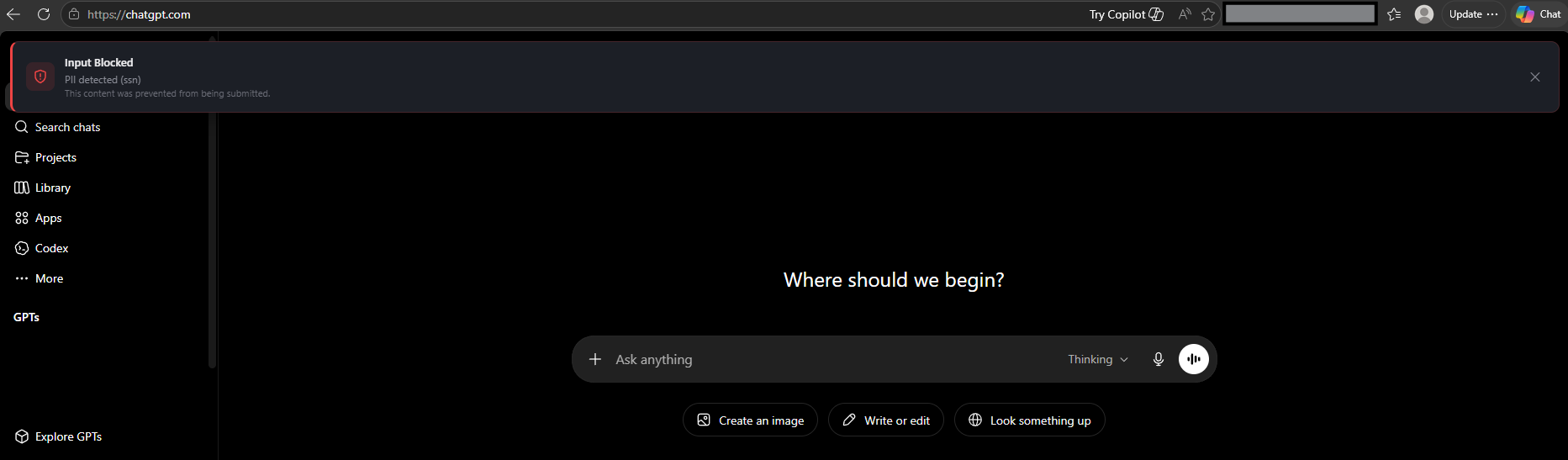
This is where browser-level control matters, because the browser is the only place that sees the actual interaction at the moment it happens. Effective shadow AI control inspects the content going into AI interfaces and applies policy inline:
- Inline DLP on prompts, so a paste of sensitive data into a chatbot can be flagged or blocked before it is submitted, not discovered in a log afterward.
- File upload and download controls, so a regulated spreadsheet does not get handed to an unsanctioned tool, and so model output coming back into the organization is accounted for.
Done well, this lets you keep a tool available while preventing the specific data exposure you actually care about. The employee gets their summary; the customer database does not leave the building.
Step 4: Keep the Receipts
The last step is the one auditors and incident responders care about: a record. When legal asks whether regulated data has gone into a public model, or when an incident requires you to reconstruct what happened, "we think we blocked that" is not an answer.
A complete audit trail of AI usage and policy events turns shadow AI from a blind spot into a governed, reportable part of your security program. Discovery, enforcement decisions, and DLP events all feed the same record, so the answer to "what is our AI exposure" stops being a guess.
Why the Browser Is the Right Place to Do This
Every step above depends on visibility that only exists in one layer. AI usage is overwhelmingly browser-mediated, and the browser is where the details live: which application the user is on, whether they signed in with a corporate or personal identity, what content they are pasting or uploading, and what the page actually is.
Network controls see traffic but not the interaction. Endpoint tools see processes but not the prompt. CASBs and proxies help with sanctioned SaaS but miss the moment a user pastes data into an AI interface. Put the control where the activity happens and you can make the decision in real time instead of generating another ambiguous alert for someone to triage later.
Surface runs as an extension across Chrome, Edge, Firefox, and Safari, with all detection and telemetry on your own infrastructure, so AI governance does not require shipping your employees' browsing data to a third-party cloud. That matters when the whole point is keeping sensitive data inside the perimeter.
If you are trying to get shadow AI under control without expanding headcount or banning the tools your teams rely on, get in touch. We would be glad to show you how Surface discovers, governs, and documents AI usage at the browser layer.