ClickFix Attacks: What They Are and How to Stop Them
A user visits a website and sees a familiar CAPTCHA prompt: "Verify you are human." They click the checkbox, and a dialog appears with simple instructions -- press Win+R, then Ctrl+V, then Enter. It looks like a routine verification step. In reality, they just executed a PowerShell command that downloaded an infostealer to their machine.
This is ClickFix -- one of the fastest-growing social engineering techniques in the threat landscape today. Over the past year, it has gone from a niche tactic used by a handful of cybercriminals to a mainstream attack vector adopted by nation-state actors and responsible for a 517% surge in detections in just six months.
How ClickFix Works
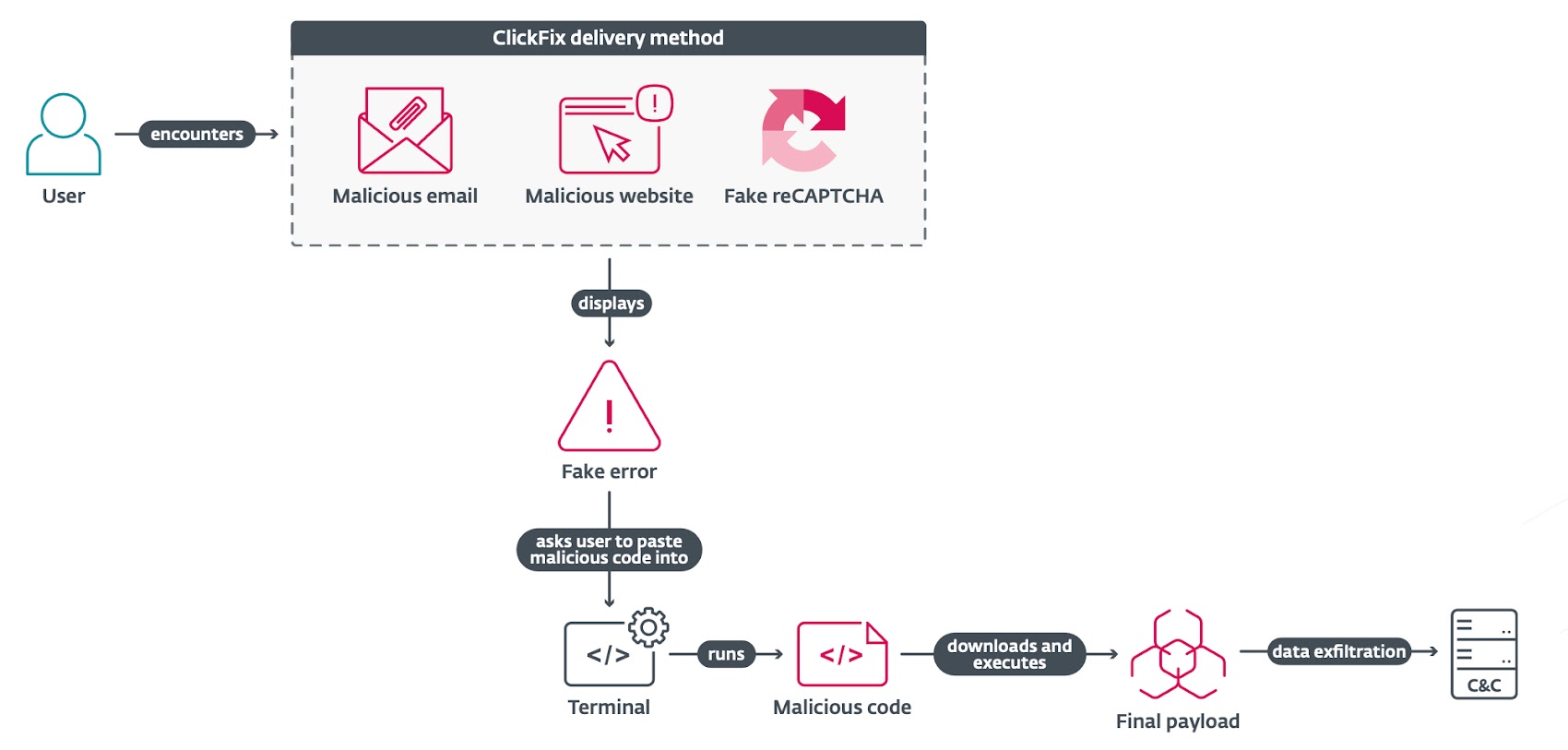
The core mechanic is deceptively simple. Rather than relying on malicious attachments or exploit kits, ClickFix convinces users to infect themselves.
The typical attack chain looks like this:
- The lure. A victim lands on a compromised or attacker-controlled web page. The page displays a fake dialog -- usually a CAPTCHA verification, a browser error message, or a document-sharing notification.
- Clipboard injection. When the user interacts with the dialog (clicking "I'm not a robot," for example), JavaScript running on the page silently copies a malicious command to their clipboard.
- Guided execution. The dialog presents "verification steps" instructing the user to press
Win+Rto open the Windows Run dialog, thenCtrl+Vto paste, thenEnterto execute. - Payload delivery. The pasted command -- typically a PowerShell one-liner -- downloads and executes malware. The visible portion of the command often looks harmless (something like
'I am not a robot - reCAPTCHA Verification Hash: 328459'), while the actual malicious code runs silently.
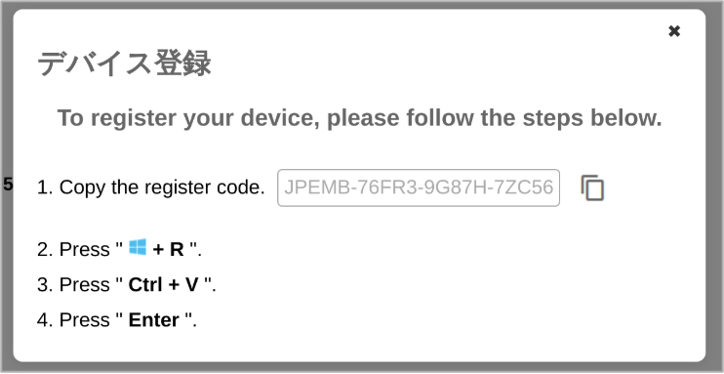
The technique is effective because it bypasses automated security controls entirely. No malicious file is attached to an email. No exploit is fired. The user manually runs the command, which means endpoint detection tools that monitor for automated execution often miss it.
Final payloads are frequently loaded in memory by living-off-the-land binaries (LOLBins) such as msbuild.exe, regasm.exe, or powershell.exe -- making them fileless and significantly harder to detect with traditional antivirus.
A Timeline of Escalation
ClickFix did not appear overnight. It evolved rapidly from a fringe technique to a tool of choice for both cybercriminals and state-sponsored espionage groups.
Early 2024: First Sightings
ClickFix was first observed in the spring of 2024, initially used in campaigns distributing infostealers like Lumma Stealer and DarkGate. The early lures were crude -- simple fake error dialogs instructing users to "fix" a browser issue by running a command. But they worked well enough to catch attention.
Late 2024: Nation-State Adoption
Between October 2024 and January 2025, state-sponsored actors from three countries adopted ClickFix in their espionage operations:
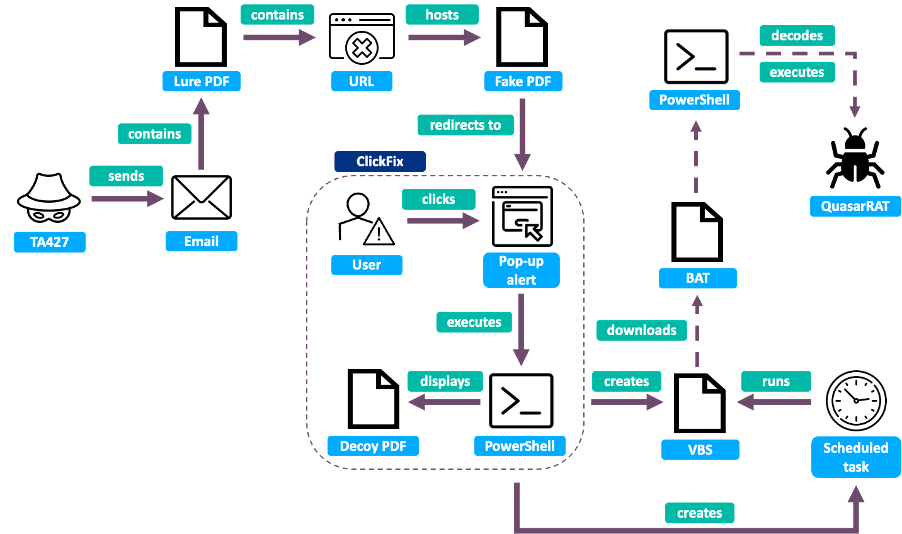
- North Korea (TA427/Kimsuky) targeted think tank researchers focused on North Korean affairs. Operators posed as Japanese diplomats, sent benign emails to build trust, then followed up with links to fake "secure drive" pages that used ClickFix to deliver QuasarRAT.
- Iran (TA450/MuddyWater) targeted at least 39 organizations across the Middle East in November 2024, sending phishing emails disguised as Microsoft security updates. Victims were instructed to run PowerShell commands with administrator privileges, which installed remote management software.
- Russia experimented with ClickFix through multiple groups, including campaigns linked to APT28 targeting Ukrainian government entities.
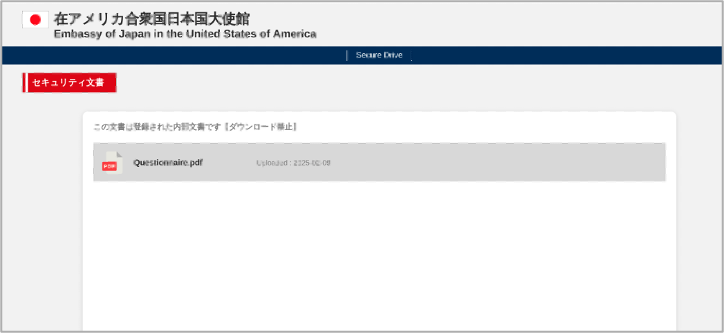
The shift was significant. These groups integrated ClickFix not as a replacement for their existing toolkits but as a new delivery stage -- replacing traditional droppers with a technique that relied on the victim doing the work.
2025: Explosive Growth
By mid-2025, ClickFix had become the second most common attack vector after phishing, with detections increasing 517% between the second half of 2024 and the first half of 2025. Microsoft Threat Intelligence reported campaigns targeting thousands of enterprise and end-user devices daily.
The technique expanded in several directions:
- Cross-platform. A campaign identified in June 2025 targeted macOS users to deliver Atomic macOS Stealer (AMOS), demonstrating that ClickFix was no longer Windows-only.
- Broader targeting. A May 2025 campaign targeted Portuguese organizations in government, finance, and transportation to deliver Lampion malware, later expanding to Switzerland, Luxembourg, France, Hungary, and Mexico.
- Diverse payloads. The list of malware families delivered through ClickFix grew to include DarkGate, Lumma Stealer, AsyncRAT, Danabot, NetSupport RAT, ransomware, cryptominers, and custom nation-state malware.
Mid-2025: FileFix Emerges
In June 2025, security researcher mrd0x published a proof-of-concept for a new variant called FileFix. Instead of targeting the Windows Run dialog, FileFix redirects users to the Windows File Explorer address bar:
- A phishing page presents a fake document notification.
- The user is instructed to press
Ctrl+L(which focuses the File Explorer address bar) and paste a "file path." - The page copies a disguised PowerShell command to the clipboard.
- The command is structured to look like a file path, using spaces and pound signs to hide the executable portion:
Powershell.exe -c ping example.com# C:\path\to\decoy.doc.
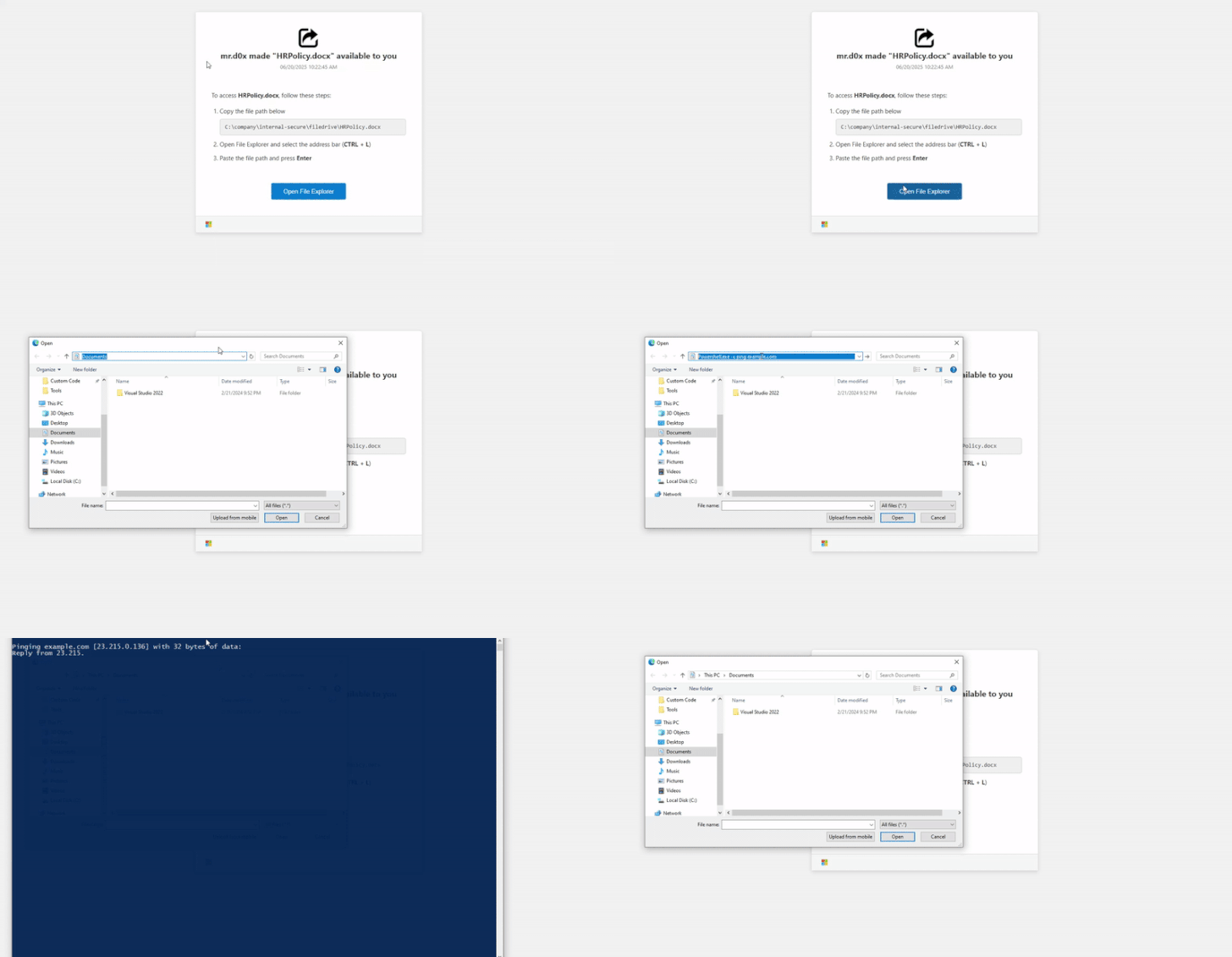
FileFix is currently a proof-of-concept with limited in-the-wild adoption, but it signals that attackers are actively innovating on the core ClickFix concept as defenders catch up.
Why Traditional Defenses Struggle
ClickFix is specifically designed to exploit the gaps between existing security layers:
- Email gateways cannot block it when the lure is a URL rather than an attachment -- and the URL itself may point to a legitimate compromised site.
- Endpoint detection often misses the execution because the user manually initiates the command. The PowerShell process looks like a legitimate user action, not an automated attack.
- Network security may not flag the outbound connection because the C2 traffic is encrypted and the domains are frequently rotated.
- User training helps but has limits. The fake CAPTCHAs are highly convincing, and the instructions exploit familiar patterns (pressing
Win+Ris something many users have done before).
The fundamental problem is that the attack happens inside the browser session -- in the gap between the email gateway and the endpoint agent. This is exactly the blind spot that most security stacks leave unmonitored.
How Surface Security Stops ClickFix
ClickFix is a browser-native attack. It starts with a web page, executes through browser APIs (clipboard manipulation, dialog rendering), and relies on the user's interaction with browser-rendered content. Stopping it requires security that operates at the browser layer -- with real-time visibility into what is happening inside the session.
This is what Surface Security is built for.
Real-Time DOM Analysis and Phishing Detection
Surface Security's browser extension captures telemetry at the DOM level -- monitoring page content, script behavior, and user interactions in real time. When a page renders a fake CAPTCHA dialog and silently writes to the clipboard, Surface Security detects it.
The platform identifies credential harvesting pages, lookalike domains, and deceptive UI patterns using DOM analysis and pattern matching. A ClickFix lure that impersonates a Google reCAPTCHA or a Microsoft login prompt triggers detection before the user can act on the instructions.
Clipboard and Script Behavior Monitoring
ClickFix relies on JavaScript clipboard manipulation -- document.execCommand('copy') or the Clipboard API -- to stage the malicious payload. Surface Security's suspicious behavior analysis identifies these patterns: a page that copies PowerShell commands to the clipboard without explicit user-initiated copy action is flagged as anomalous.
Combined with redirect chain tracking, this catches multi-stage ClickFix campaigns where the user is bounced through several domains before landing on the lure page.
Custom Detection Rules for Organizational Context
Every organization has a different risk profile. Surface Security's visual rule builder lets security teams create context-aware policies targeting ClickFix-style behavior -- for example:
- Block or warn on pages that programmatically write to the clipboard and display Run dialog instructions.
- Flag navigation patterns consistent with ClickFix delivery chains (redirects from phishing emails to lure pages).
- Alert when users visit domains associated with known ClickFix infrastructure.
Rules can be scoped by department, role, or user group, allowing tighter controls for high-risk populations like executives or finance teams.
Investigation-Ready Forensics
When a ClickFix attempt is detected -- or when a user reports a suspicious page -- Surface Security provides the full forensic context SOC teams need:
- Full session reconstruction with DOM snapshots showing exactly what the user saw.
- Correlated redirect chains tracing the path from the initial phishing link to the lure page.
- User interaction tracking showing whether the user interacted with the malicious dialog.
- One-click SIEM export with a forensic-grade timeline for incident response workflows.
This turns a ClickFix attempt from a vague "the user may have run something" into a complete, investigable event.
On-Premises Data Sovereignty
Surface Security runs entirely on-premises. All browser telemetry, detection logic, and forensic data stay within your infrastructure -- no cloud dependencies, no data leaving your perimeter. For regulated industries dealing with ClickFix campaigns targeting government, finance, and healthcare organizations, this is not optional.
What Security Teams Should Do Now
ClickFix is not going away. The technique is simple, effective, and actively evolving. Here is what we recommend:
- Close the browser blind spot. If your security stack jumps from email gateway to endpoint agent with nothing in between, ClickFix-style attacks will reach your users undetected. Browser-level security fills this gap.
- Monitor for clipboard manipulation. Pages that programmatically write to the clipboard -- especially content containing PowerShell,
cmd, or encoded commands -- should be treated as high-confidence indicators of social engineering. - Update user awareness training. Users need to understand that legitimate websites never ask them to open the Run dialog or paste commands. This is always an attack.
- Hunt for ClickFix indicators. Look for PowerShell execution initiated from
explorer.exeorcmd.exewith encoded or obfuscated arguments, especially when preceded by browser activity on unfamiliar domains. - Prepare for variants. FileFix is the first evolution, but it will not be the last. Attackers will continue finding new ways to trick users into executing commands. Detection needs to focus on the underlying behavior pattern, not just specific lure templates.
ClickFix represents a fundamental shift in how attackers think about initial access. Instead of fighting through email filters and endpoint defenses, they hand the payload to the user and let them run it. Defending against this requires meeting the attack where it lives -- inside the browser.
If you want to see how Surface Security detects and stops ClickFix attacks in your environment, get in touch.